In the data processing work-flow for scanning mapping measurements, a wide variety and large volume of data attributes may need to be extracted and analyzed. Therefore new classes, h5xs_an and h5xs_scan, are created to provide more flexibility. A new h5 file is created for the processed data, while the raw data are kept separately in their original h5 files. The processed data are organized in a proc_data dictionary, organized in three levels:
-
Sample name. This could be the sample name defined in the scan when collecting the raw data, or
overall, if the final results are assembled from multiple raw data files. -
Data key. Here are a few already used in
lixtools:Iqphifor the 2D intensity map as a function of scattering vector \(q\) and azimuthal angle \(\phi\);Iqfor azimuthally averaged intensity;attrsfor per-frame attributes extracted from the data;mapsfor structural maps reformatted fromattrsbased on the scan parameters;tomofor tomograms reconstructed frommaps. -
Sub key. For instance,
mergedandsubtractedforIq,transmissionandincidentforattrs.
Here's an example of typical code for data processing. First we instantiate the h5xs_scan object:
from lixtools.hdf import h5xs_scan

rn = "time_series1"
dt = h5xs_scan(f"{rn}_an.h5", [de.detectors, qgrid], Nphi=61, pre_proc="2D",
               replace_path={"legacy": "proposals"})
de defines the detectors as in solution scattering. Nphi specifies the number of azimuthal
angles (evenly spaced) to be used for pre-processing that generates the \(q\)-\(\phi\) maps, as specified by pre_proc. The replace_path argument
is necessary since currently the h5 files for raw data must be moved to the proposal directory manually.
Next we connect the h5xs_scan to the raw data files and import the metadata from the scans that produced the raw data:
for fn in sorted(glob.glob(f"{rn}-*.h5")):
    dt.import_raw_data(fn, force_uniform_steps=True, prec=0.001, debug=True)
Now we can perform the pre-processing, using multi-processing:
dt.process(N=8, debug=True)
Once the \(q\)-\(\phi\) maps are produced, the attributes can be generated and reorganized into maps:
for sn in dt.samples:
    dt.extract_attr(sn, "int_saxs", get_roi, "qphi", "merged",
                    qphirange=[0.02, 0.05, -180, 180])
    dt.extract_attr(sn, "hop", hop, "qphi", "merged", xrange=[0.04, 0.06])

dt.make_map_from_attr(save_overall=False,
                      attr_names=["transmitted", "absorption", "int_saxs", "hop"],
                      correct_for_transsmission=False)
The extract_attr() method extracts an attribute from the processed data under sample name sn, data key qphi,
and sub key merged, using the the user-specified/defined function (get_roi or hop), whose first argument must
be the input data, with the specified keyword arguments (qphirange or xrange).
During and after processing, the data can be visualized using a GUI:
 Or the data can plotted using
 matplotlib:
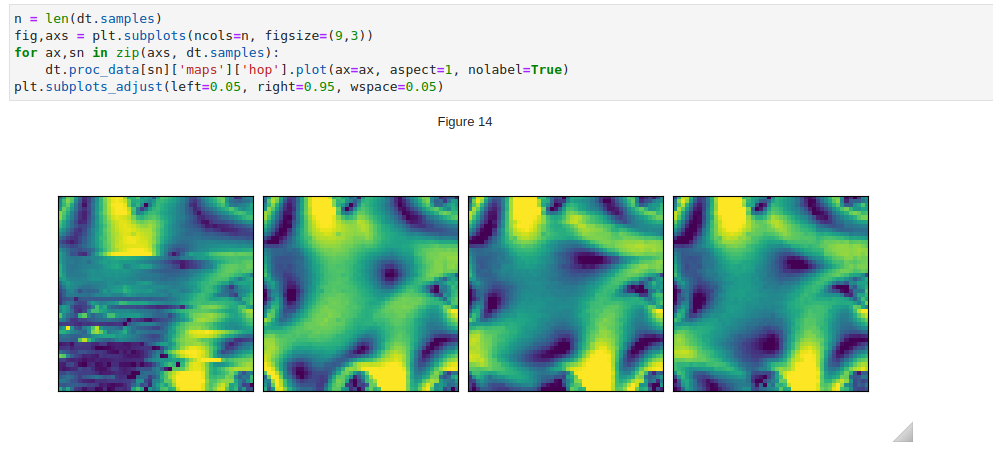 In this examples, the 4 measurements('samples') correspond to 4 data points in time as a flow field is established. In some cases,
these measurements could correspond to parts of a larger sample, the individual maps can then be merged based on the
coordinates in the metadata from the scans.
In this examples, the 4 measurements('samples') correspond to 4 data points in time as a flow field is established. In some cases,
these measurements could correspond to parts of a larger sample, the individual maps can then be merged based on the
coordinates in the metadata from the scans.